
Interactive charting
Review price action, candlestick patterns and trend structure with visual chart tools.
CHART STUDIES ↗Advanced trading analysis software with interactive charts, technical indicators, market scanners and custom analytical alerts — built for structured, independent market research.
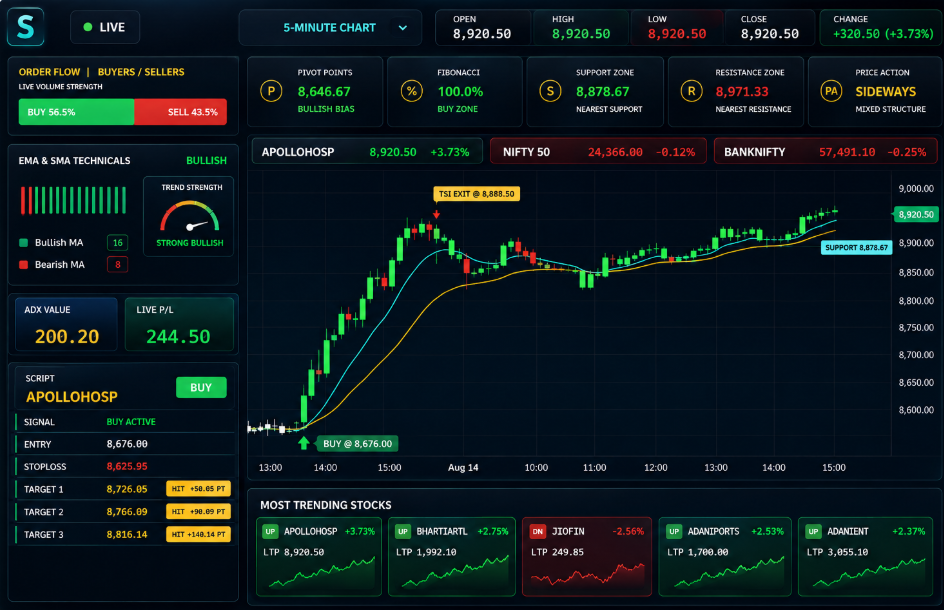
Use visual tools to explore price behavior and technical conditions. Features vary by software package and data-feed availability.
Review price action, candlestick patterns and trend structure with visual chart tools.
CHART STUDIES ↗Use indicator-based studies to understand momentum, trend and market conditions.
ANALYSIS TOOLS ↗Apply predefined or available custom filters to review a selection of market instruments.
SCREENING TOOLS ↗View chart information and technical observations in a structured interface.
WORKSPACE ↗Review alerts when selected chart-based analytical conditions are met, subject to configuration.
ALERT TOOLS ↗Request a live demonstration to better understand software functions and plan options.
DEMO SUPPORT ↗Bring charting, indicator readings and market scans into a connected analytical workflow. The dashboard is designed to help you interpret information and conduct your own research.
Review market structureUnderstand how prices and indicators appear on charts.
Explore technical conditionsUse scanning and filtering to narrow your research.
Evaluate before choosingAsk our team about supported segments and package details.
Contact our team using the number listed on this page.
See the user interface, key analytical tools and product features.
Confirm pricing, included features, market-data charges and renewal terms before deciding.
Package pricing, software-license validity, applicable data-feed charges, mobile-app fees, training and renewal terms depend on the selected offering. Request the current plan sheet and written terms before payment.
Important information to help you evaluate the platform.
No. Stockara provides analytical software. Market signals, indicators, example trades and alerts are not guarantees of accuracy, profitability or future performance.
Yes. You can request a software demonstration through the contact options on this page, subject to team availability.
Inclusions, license validity, supported segments and any recurring charges depend on your selected package. Ask for the current written plan details before purchase.
This page promotes technical market analysis software, not investment advice, portfolio management, or assured-profit services. Make trading decisions independently and consult an appropriately licensed professional if advice is needed.
After receiving your written order confirmation, the payment information is available on the Plans & Pricing page. Verify the account holder and UPI ID with our team before transferring money.
Contact our team with your order reference and payment transaction ID so the payment can be verified and a receipt or invoice arranged.
Talk with our team to arrange a demonstration or request product and pricing information.
Stockara provides charting, technical market analysis, screening and related software tools for informational and educational use. The software does not guarantee trading accuracy, profits or prevention of losses. Trading and investing in equities, derivatives, commodities and other financial instruments can result in substantial financial loss, including loss of capital. Any chart values, trading labels, returns or position examples displayed in software screenshots are illustrative only. Nothing on this website constitutes individualized investment advice or a recommendation to transact. Product features, pricing and service terms should be verified with the company before purchase.